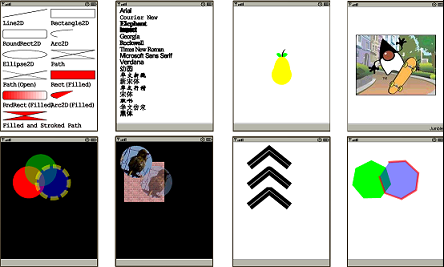
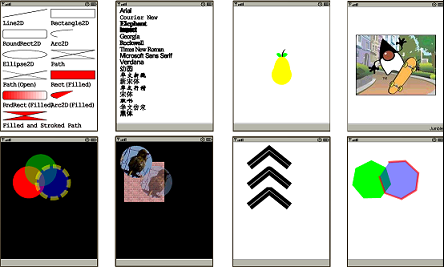
MapDigit Graphics 2D API on J2ME provides useful set of standard shapes such as points, lines,rectangles, arcs, ellipses, and curves. Arbitrary shapes can be represented by combinations of straight geometric primitives.
The Shape interface represents a geometric shape, which has an outline and an interior.This interface provides a common set of methods for describing and inspecting twodimensional geometric objects and supports curved line segments and multiple sub-shapes.The Shape interface can support curves segments.
it has similar Geometric support as in J2SE platform ,please refer to Drawing Geometric Primitives
and Stroking and Filling Graphics Primitives
November 27, 2009
Geometric Primitives
November 26, 2009
Mobile platform (Android,J2ME,Windows Mobile & iPhone)
I have Google G1 phone, HTC Windows Mobile Diamond, Apple’s iPhone, and several Nokia, Motorola phones which support Java KVM (J2ME), today’s mobiles are much more powerful than the first comptuer I used (CPC-464) ,which as 320X200 resolution and 64K memory, and with 3G getting popular and getting cheaper, Mobile device sooner or later will change people’s life and applications on mobile will have giant markets, some day in the future, people will have a “Star Trek” tricorder in their hand, which connect them with the rest of world, phone, navigator, scanner ,wallet ,camera, etc.
Currently there are still a lot different mobile platforms , J2ME will still be very popular on most mobile device, Andorid, iPhone and windows mobile will be the main streams for the mobile platform. To make thing much easier ,MapDigit implements and will implement libarary only with Java and C# and try to make the libarary(algorithms) platform indepenant as much as possible.
November 25, 2009
MapDigit Graphics 2D Rendering
The core class of the Graphics 2D API is com.mapdigit.drawing.Graphics2D class,similar to class javax.microedition.lcdui.Graphics, but provide access to the enhanced
graphics and rendering features of the Graphics 2D API. These features include:
- Rendering the outline of any geometry primitive, using the pen and brush attributes(draw method).
- Rendering any geometry primitive by filling its interior with the color or pattern specified by the brush attributes (fill method).
- Rendering any text string (drawString method). The font attribute is used to convert the string to glyphs, which are then filled with the color or pattern specified by the brush attributes.
- Rendering the specified image (drawImage method).
In addition, the Graphics2D class supports the Graphics rendering methods for particular shapes, such as drawOval and fillRect.
All methods that are represented above can be divided into two groups. First group contains methods to draw a shape. Second group contains methods to affect the rendering. The last group operates with a term attributes.
You can modify the state attributes that form the Graphics2D context for followingpurposes:
- To vary the stroke width (Pen)
- To change how strokes(Pen) are joined together
- To translate, rotate, scale, or shear objects when they are rendered
- To define colors and brushes to fill shapes with
November 24, 2009
Coordinates in MapDigit Graphics 2D API
In J2SE Graphics 2D API, it maintains two coordinate space
User space – The space in which graphics primitives are specified
Device space – The coordinate system of an output device such as a screen, window.
On Mobile device, because of realestae of screen, normally there’s no concept of overlapped windows, like MIDP2.0.
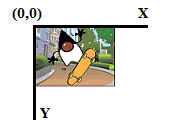
So MapDigit Graphics 2D API ‘s user space and device space are same, the origin of user space is the upper-left corner of the component’s drawing area. The x coordinate increases to the right, and the y coordinate increases downward, as shown in the picture, the unit alone the axis is pixel.
If you still prefer uses different User space or device space, it still possible,define your own user space and then apply AfflineTransform to the Graphics 2D canvas.
November 23, 2009
Overview of Graphics 2D
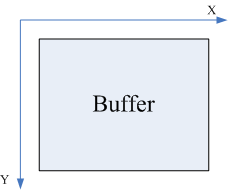
To make the Graphics 2D API portable across platform, the API is designed indepandant on any native graphics system (like LCDUI or LWUIT etc). It’s “Canvas” actaully is a 2 demension integer arrary.
The constructor Graphics2D(int width,int height) creates an internal buffer of type 32-bit integer ,each element is a ARGB value ,stand for one pixel.
All the drawing primitives like draw a line, fill a rectange etc is actually modifying pixel (ARGB value) in the 2 demesional array.
After all rendering work is done, call Graphics2D.getRGB() to get the int [] buffer, and then call any native render method to actually render the buffer to the physical device screen.
so typical usage of Graphics 2D API is as following
Graphics2D graphics2d=new Graphics2D(width,height)
graphics2d.clear(backgroundColor)
…any render primitives
int []rgb=graphics2d.getRGB();
//call native graphics to render the buffer to screen
graphics.drawImage(rgb, …);
November 22, 2009
Graphics 2D API on J2ME
When I started working on GIS application on mobile, I started with vector map, actually I used MapInfo data can converted to my own format, which support spatial index (rtree index) ,the major rendering problem ,on J2ME or even Windows CE compact version ,the graphics API is not power enough ,like support pen with width more than 1 , fill a polyon etc. On J2ME platform, there’s one powerful Graphics API provided by Tinyline (http://www.tinyline.com/) ,it supports similar API as on J2SE platform ,like basic shapes, paths, texts, outlined fonts and images. it fits for my needs, I bought the standard licence from Tinyline. The API interface is not like J2SE or Window Mobile Compact Framework, it uses its own graphics concepts, so I wrote a wrapper on top of the Tinlyline Graphics API + plus 2D Geometry Shape support ,that comes my first version of Graphics 2D API (biz.guidebee.drawing). Tinyline API is great API, but I later with more graphics requirements from GIS engine impelmentation and obfuscated API is not always working on some devices, and it’s hard to debug without have the source code, gradually I wrote my own Graphics 2D API without using Tinyline Graphics 2D, current version of MapDigit Graphics2D API (package, com.mapdigt.drawing & com.mapdigit.drawing.geometry) provides same interface as it’s first version ,but with a complete rewrting. Perople with J2SE Graphics API or Windows mobile Compact version GDI experiences will find the API uses the simlar API interaces as J2SE or Window moble .Net compact version. and the API is independent on J2ME LCUDI ,it works both with CLDC/MIDP and LWUIT Graphics framework.
It also support vector font ,
- A wide range of geometric primitives, such as curves, rectangles, and ellipses, as well as a mechanism for rendering virtually any geometric shape
- Mechanisms for performing hit detection on shapes, text, and images
- Enhanced color support that facilitates color management
- Control of the quality of the rendering.
- Fill, stroke and dash
- Affine transformations
- Outline fonts
- Left-to-right, right-to-left and vertical text layouts
- Anti-aliasing
- Opacity
- Icon ,images
November 18, 2009
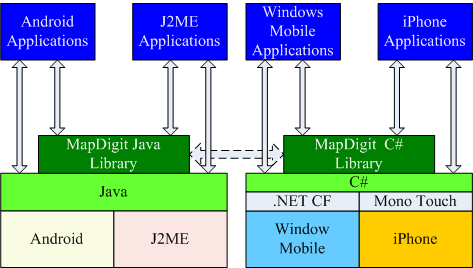
MapDigit API Package Diagram
MapDigit mainly provides GIS Engine API on mobile platform.
Graphics 2D API implements a mobile 2D graphics engine for J2ME platform (CLDC/MIDP). It handles basic shapes, paths, texts, outlined fonts and images in a uniform way.Generally speaking, Guidebee graphics 2D API provides similar functionality with corresponding graphics 2D API on Java Standard platform.
GIS Engine API implements a mobile GIS engine on J2ME platform (CLDC/MIDP). It support online, offline, raster and vector map in the same package.and support find an address and get a direction. and probablly it’s the first GIS Engine API that support turn-by-turn navigation API(not the get direction function), with the Navigation API, it’s quite easy to write your customerized voice navigation software and even uses your favorite people’s voice :-).
The UI toolkit is acutally build on top of Sun’s LWUIT library.plus a efficient microsoft’s pattern and practices and treeview ,submenu, context menu etc.
November 7, 2009
Guidebee Navigator will be avaiable for downloading soon
Today, I nearly finished my own navigation software on Mobile device, I called it guidebee navigatior. I’ll begin testing in the following month and hopefully will have a offically release before Christmas :-).
I started the hobby on GIS LBS application roughly 3 years ago, when I was still working for Motorola, I travelled to Plantataion ,FL and one of my coworker showed my one amazing navigation application Telnav on motorola iDEN phone, I was immediately impressed by the accuracy and turn by turn voice navigation. Telnav is an online application, it gets GIS data from its server, at that time, I was trying to find an standalone GPS application, I searched on ebay, and find Microsoft Travel and Streets 2006 and buy HP 4700 PDA, Microsoft’s Pocket Street has been one of my favorite LBS mobile application, though it doesn’t acutally provide turn by turn navigation.
When I returned China, I tried to find similar navigation application, there were some out there, but compared to Telnav or Pocket Street, the quality is so bad and I could bear them. I decided to write my own version of “Pocket Street”. I have seen several version of my own pocket streets (some on window mobile with satellite map and some with MapInfo vector map). During the past 3 years ,of course in my spare time, I learned a lot on GIS and LBS and my “Pocket Streets” becomes better and better. Generally speaking it’s now an online version of Microsoft pocket street plus much more.
- Support world map, it doesn’t restrict to any speicific region, if only you have network connection ,it will show the map where you are.
- Multiple map type to choose from, Microsoft Bing map, Micrsoft Satellite Map, Nokia ovi map ,Yahoo map, OpenStreetMap or any custom map you like.
- Internal GPS or bluetooth GPS support
- Get my location ,it will first find your ISP assgin IP address location and if GPS device is avaiable it will show your currrent location.
- GPS compass, it displays satellite signal, azmith ,speed meter etc.
- Search include search by address, business name, local search, search by IP address, search by latitude,longitude pair.
- Get Direction, multiple waypoint or search from current location.
- Turn by turn voice navigation and rerouting if needed.
- Favorite point of interest managment.
- Microsoft MSN Messenger integrated etc
For more information about this application ,please visit http://www.mapdigit.com/